


Relay for reddit
4.07.10K Reviews
App Specs
- Version
- 13.1.09
- Updated On
- License
- Free
- Downloads
- 100,000+
- Developer
- DBrady
- Categories
- News & Magazines
- Platform
- Android
Screenshots
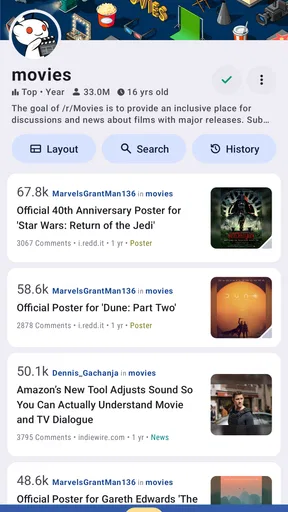




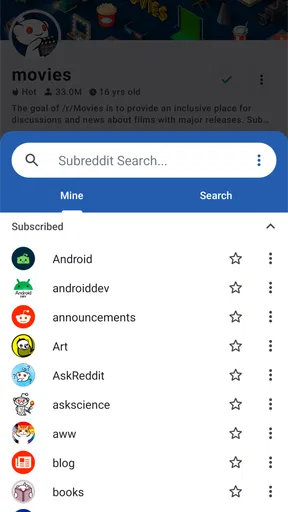
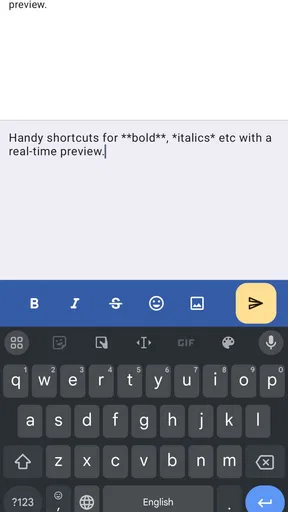
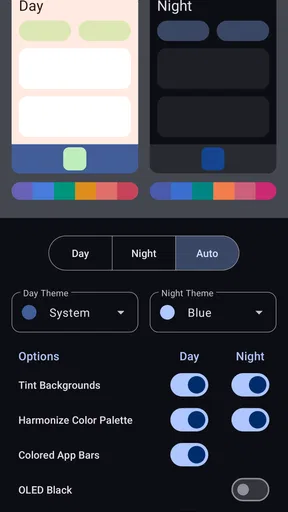
 Analysis by AppCompare
I tend to judge a Reddit reader by what happens during ordinary use: can I scan a busy feed, open a post without losing my place, and follow a long comment thread without turning the whole session into work? That is the lens I bring to Relay for reddit. It is a free news and magazines app from DBrady, built around a more mobile-focused way to browse Reddit. Its current version is 13.1.00, and its long history on mobile gives existing users a familiar place to keep up with communities they already follow.
How Relay fits into a current Reddit routine
Relay makes the most sense for people who already know what they want from Reddit: a quick look at subscribed communities, a few interesting discussions, perhaps a video or image post, and a chance to reply. Its interface is arranged to keep those activities close at hand. I like that the experience puts reading and moving between areas ahead of the feeling of navigating a dense website on a small screen.
That focus is useful in short sessions. On a commute, I can check a community, skim headlines, and save my attention for a thread that deserves it rather than opening every post. At home, I can settle into a longer discussion and use the thread controls to keep track of replies. The same app can serve both habits, although the endless supply of posts also makes it easy to stay longer than intended.
Relay is rated 4.1 on average, with around 37,000 ratings and roughly 7,100 written reviews. It has over 100,000 installs and is rated Mature 17+, so it is intended for an adult audience. Those figures give a sense of an established app with an active user base, but they do not tell me whether every individual community will suit a particular reader. Reddit’s content depends heavily on the communities you choose to follow.
What its long development history tells me
The app was released on August 3, 2011, and version 13.1.00 is its current version. That span suggests a product that has continued through many cycles of mobile design rather than a new reader built around a passing trend. The practical value of that history is continuity: people who have made Relay part of their Reddit routine can return to a dedicated interface instead of starting over with a different way to browse.
I would separate that confirmed product history from guesses about what comes next. A version number alone does not tell me which individual features changed, how often updates arrive, or what the next release will add. What I can judge is the present balance: Relay offers a polished reading workflow and familiar Reddit actions, while its appeal still depends on whether its current interface and behavior match the way you use the service.
How existing users can get more from it
If you have just installed Relay, I would spend a few minutes adjusting the display before deciding whether its feed feels right. Text size and layout affect how quickly I can scan a page, and a theme that is comfortable in a bright room may not be ideal at night. A small setup session can make repeated visits feel less tiring. I would change one setting at a time, then browse a few posts, rather than changing everything and forgetting which adjustment helped.
Worth Reading Before You Choose

EA SPORTS FC Mobile 26 Is a Bigger Football Game, but It Takes Time

Flipboard Shows What News Apps Must Do Beyond the Feed

Switching to Android Auto Means Rethinking Your Driving Routine

Google Calendar Makes a Crowded Week Easier to Manage

Ludo King Makes the Most of the Minutes Between Plans

Baby Panda World Brings Quick Play to Modern Phones, but Its Game Library Feels Busy
For long comment chains, collapsing branches is more than a tidy-screen option. It lets me follow one exchange while setting aside side conversations, then reopen a branch if a reply points to something worth reading. That is especially useful in a post with several parallel arguments. A reader who usually opens only headlines may not need this control, but anyone who enjoys discussion can use it to turn a sprawling thread into a more manageable reading path.
Notifications are worth treating as a deliberate choice rather than leaving every alert enabled. I would keep the replies and messages I genuinely want to see, then reduce the rest if they interrupt work or sleep. This is a practical way to preserve the usefulness of Reddit without letting a busy inbox dictate when I check the app. The right setup depends on whether you use Reddit for active conversations or mainly as a quiet reading feed.
Where it differs from other ways to read Reddit
Compared with browsing Reddit in a mobile browser, Relay feels like a purpose-built reader: its menus and post interactions are arranged for repeated use on a phone. A browser may be preferable if you want to avoid maintaining a separate app or only visit Reddit occasionally. The trade-off is that a browser session can feel less tailored to moving among subscriptions, inbox items, and discussions.
Compared with a general news app, Relay offers a different kind of curation. Rather than presenting a single editorial front page, it lets your chosen Reddit communities shape what you see. That makes it useful for niche interests and community discussion, but it also means your feed can be uneven. If you want a concise, professionally edited news briefing, a conventional news reader may be a better fit; if you want links, reactions, and conversation gathered around communities, Relay is closer to the mark.
There is also a difference between a focused Reddit client and simply opening the official Reddit experience. People who rely on a particular interface, account workflow, or platform-specific feature should compare the current options before moving their daily routine. Relay’s strength is its reading-oriented presentation, not a promise that every Reddit habit will work identically across clients.
Small choices that improve a real session
One useful habit is to treat the front page as a starting point, not a complete picture of Reddit. When I am looking for a particular kind of discussion, I go directly to the relevant subscription instead of repeatedly refreshing a mixed feed. That makes browsing more purposeful and reduces the odds that a session becomes an unplanned tour through unrelated posts.
For media-heavy browsing, I would decide whether I want to watch or read before opening a string of posts. Relay’s media viewer makes images and video accessible within the browsing flow, which is convenient, but a steady stream of clips can consume time and attention quickly. If I am checking Reddit in a brief gap, I focus on text posts or a single saved-for-later discussion rather than letting autoplay-style habits take over; the point is to use the viewer when media is the reason I opened a post.
Another practical approach is to use thread collapsing as a filter, not just a way to shorten the page. I can close branches that repeat the same point, keep the replies that add context, and then return to the post’s main argument. This helps when a discussion is lively but not every reply is equally useful. It also makes Relay more comfortable for readers who otherwise find Reddit comments too crowded to follow.
What may frustrate some readers
Relay’s flexibility has a learning cost. If you prefer an app that makes every decision for you, themes, layout choices, and navigation options can feel like extra setup rather than a benefit. The best response is not to explore every setting at once: pick a readable theme, set text to a comfortable size, and leave the rest alone until a specific annoyance gives you a reason to change it.
Infinite scrolling is convenient, but it does not provide a natural stopping point. I would not choose it as my main source of urgent news if I needed a carefully bounded summary; Reddit can mix useful reporting, personal reactions, jokes, and speculation in the same browsing session. For high-stakes or time-sensitive information, I would check the original source and use a trusted news outlet for verification rather than treating a popular post as confirmation.
Relay is also not the right choice for someone who does not want a community-driven feed or who expects every discussion to be civil and well moderated. Reddit’s content and tone vary from one community to another. The Mature 17+ rating is a reminder to choose subscriptions thoughtfully, especially if the phone is shared or the user is younger. The app can organize access to Reddit, but it cannot make every community’s material suitable for every reader.
Cost, access, and who should try it
The app is free to download, with in-app purchases ranging from about a dollar to around ten dollars per item. I would start with the free experience and decide whether anything beyond it matters to my routine instead of assuming a purchase is necessary. That makes it easier to assess the core reading experience first. The minimum operating-system requirement is version 7.0, which gives the app a broad technical baseline, though a reader should still check compatibility with their own device before relying on it.
I would recommend trying Relay if you already spend time in several Reddit communities and want a mobile interface centered on browsing, media, and threaded conversation. It is particularly suited to readers who like to tune text and appearance, and to people who move between quick checks and longer comment sessions. It is less compelling if you visit Reddit only once in a while, want a tightly edited news feed, or would rather not spend time adjusting an app to personal taste.
First Impressions and User Interface
When I first opened Relay, I was hit with a clean, intuitive interface that just screams "user-friendly." Seriously, it's like the developers read my mind and knew exactly how I wanted my Reddit to look. The app's design is sleek, with a focus on readability. The fonts are crisp, and the color scheme is easy on the eyes—even during those late-night scrolling sessions.
Navigation is a breeze. The bottom menu bar is your new best friend, offering quick access to your front page, subscriptions, inbox, and more. It’s like having a personal Reddit assistant right at your fingertips. Everything is just a tap away, making it super convenient to jump between subreddits or check out the latest memes.
Customization Galore
One of the standout features of Relay is the level of customization it offers. You can tweak almost everything to make the app truly yours. From themes and text sizes to layout options, it's all about personal preference here. It's almost like the app encourages you to play around with the settings until you find your perfect Reddit setup.
If you're someone who likes to keep things fresh, you'll appreciate the variety of themes available. Whether you prefer a dark mode or something more vibrant, Relay has got you covered. Trust me, once you start customizing, it's hard to stop.
Browsing and Interaction
Browsing through posts is smooth and seamless. The app supports infinite scrolling, which means you can keep digging for content without any annoying interruptions. And let's talk about the media viewer—it's top-notch. Whether you're watching a video or checking out an image gallery, the experience is fluid and engaging.
Interacting with posts is just as satisfying. You can upvote, downvote, and comment with minimal effort. The comment section, which can often be a nightmare on other platforms, is well organized and easy to navigate. You can even collapse threads to focus on the discussions you're interested in, which is a game-changer for those lengthy debates.
Notifications and Performance
Relay doesn’t miss a beat when it comes to notifications. You’ll get real-time updates on replies, messages, and more. It’s like having your finger on the pulse of the Reddit world. Plus, you can customize which notifications you want to receive, so you don’t have to worry about getting bombarded with alerts.
Performance-wise, Relay is a champ. The app runs smoothly without any noticeable lag, even when I had multiple subreddits open. It’s reliable, and you won’t find yourself cursing at your phone because the app froze at a crucial moment.
Final Thoughts
All in all, Relay for reddit is a fantastic app for anyone looking to enhance their Reddit experience. Its combination of a user-friendly interface, extensive customization options, and reliable performance makes it a top choice for Reddit enthusiasts. It’s clear that a lot of thought and care went into developing this app, and it shows in every tap and swipe.
If you haven't tried it yet, I highly recommend giving it a shot. Whether you're a seasoned Redditor or a newbie, Relay has something to offer. Who knows? It might just become your favorite way to browse Reddit.
Pros
- Clean
- intuitive user interface.
- Highly customizable settings.
- Fast performance and loading times.
- Supports multiple accounts.
- Offline browsing feature.
Cons
- Occasional ad interruptions.
- Limited free theme options.
- No direct messaging feature.
- Some features require premium.
- Can drain battery quickly.
FAQs for Relay for reddit
What is Relay for reddit and how does it differ from the official Reddit app?
Relay for reddit is a third-party app designed to enhance the Reddit browsing experience on mobile devices. Unlike the official Reddit app, Relay offers a unique interface with customizable themes, gestures, and intuitive navigation. It’s ideal for users seeking a more personalized and streamlined way to interact with Reddit content.
Is Relay for reddit free to use, or does it require a subscription?
Relay for reddit is available as a free app, but it also offers a Pro version for purchase. The Pro version unlocks additional features such as ad-free browsing, more customization options, and enhanced functionality. Users can choose between using the free version or upgrading to Pro based on their preferences.
How does Relay for reddit handle privacy and security?
Relay for reddit respects user privacy and does not collect personal data beyond what is necessary for app functionality. It connects directly with Reddit’s API, ensuring secure access to your Reddit account. Users are advised to review permissions and privacy settings to ensure a secure experience.
What customization options are available in Relay for reddit?
Relay for reddit offers a rich array of customization options, including theme selection, font adjustments, and personalized gestures. Users can tailor their browsing experience by choosing from various color themes, adjusting text size for readability, and setting up custom swipe actions to navigate through posts efficiently.
Does Relay for reddit support multimedia content like images and videos?
Yes, Relay for reddit supports a wide range of multimedia content. It allows users to view images, GIFs, and videos directly within the app, providing a seamless and engaging experience. The app is optimized for media-heavy subreddits, ensuring smooth playback and easy access to visual content.


